In short
- A virtual office online is a persistent online space where a remote or hybrid team works during the day.
- You can see who is available and start a conversation by walking up to them on a map, with no meeting link.
- It is not a business address, and it is not a remote desktop. It sits next to chat and video calls and does not replace them.
A virtual office is a persistent online space where your team stays during the workday. Instead of existing only when someone opens a meeting, the team shows up in one shared place: you can see who is working, who is busy, and who is free to talk right now, and start talking without booking a slot. People also search for this as a “virtual office online”: a place the team can keep open during the day, not a meeting that starts and ends with a link.
It sounds simple, and it is. But the idea changes a lot about how people work when they are far apart. In this guide we explain the concept, how it works in practice, how it differs from Zoom, Meet, and Slack, and how to tell whether it fits your team.
Virtual office: the definition in a few words
Picture the floor of a physical office: desks, a meeting room, the kitchen, the hallway. Now bring that onto the screen. Everyone has a place, everyone can see who has arrived, and conversations happen when one person walks up to another. That is a collaborative virtual office.
Three traits set a virtual office apart from other remote work tools:
- Persistence: a persistent virtual office is there all day, whether or not a meeting is happening.
- Visible presence: you can see who is nearby and what each person’s status is.
- Spontaneous conversation: talking to someone means going over to them, not sending a link and waiting.
Virtual office for teams vs. a virtual business address
The same words describe two different services. This guide is only about the first.
| Virtual office for teams (this guide) | Virtual business address | |
|---|---|---|
| What it is | A persistent online workplace, with a map, presence, and conversation | An address, mail handling, and sometimes a physical room |
| Who it is for | Remote and hybrid teams that want to work together | Companies that need a formal seat or front desk |
| Does Capitown offer it? | Yes, as virtual office software | No |
Virtual office, remote office, virtual workplace: the terms people use
Several phrases point to the same idea, and a few point somewhere else. Here is how we use them in this guide.
| Term | What it usually means | Same as a virtual office for teams? |
|---|---|---|
| Virtual office online / online virtual office | An online space the team keeps open during the day | Yes |
| Virtual workplace / virtual workspace | A broad term for the digital place where work happens. Sometimes it means a virtual office, sometimes the whole set of tools | Partly |
| Remote office | Traditionally a branch office away from headquarters. In remote work, it can also mean the home setup of each person | No, unless it refers to a shared online space |
| Virtual remote office | Usually a virtual office used by a fully remote team | Yes |
| Remote desktop (Citrix, Azure Virtual Desktop) | Access to a computer or desktop from somewhere else | No: it gives access to a machine, not to people |
| Virtual business address | An address and mail service for a company | No. Capitown does not offer it |
If you work from home and miss the team, the term you are looking for is probably a virtual office for remote workers. We cover the day-to-day in virtual office app for remote workers.
How a virtual office works in practice
Each product approaches this differently. In Capitown, the office is a live pixel-art map seen from above, with desk clusters for each team, a meeting room, a kitchen, a lounge, and an entrance hall.
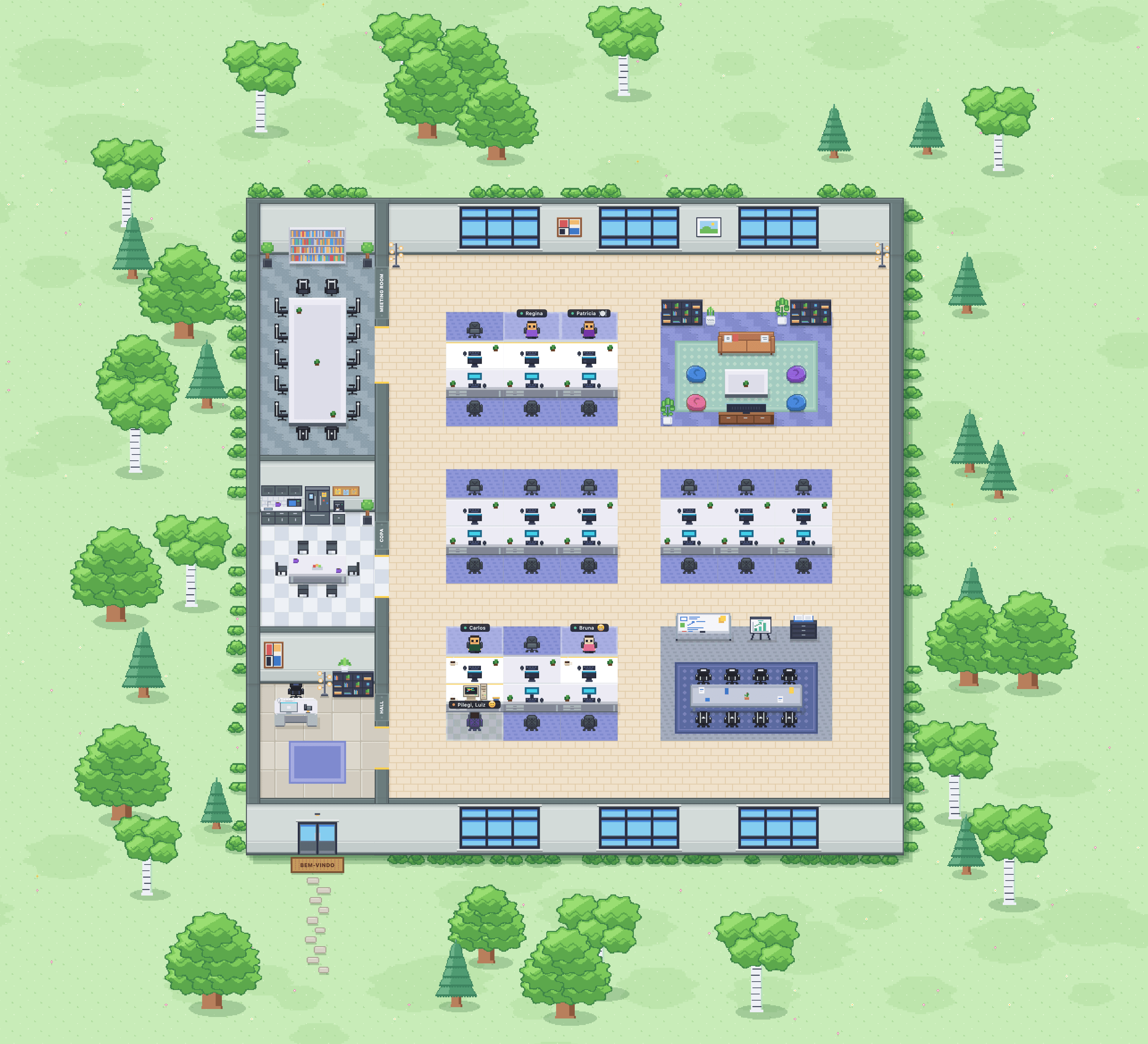
- 1You arrive through the hall. Your avatar appears near the door, and the “My desk” shortcut takes you straight to your seat.
- 2You walk around the map with the arrow keys, WASD, or a double click on the floor, like in a game.
- 3You walk up to a teammate and an invite to talk appears. One click (or the J key) opens the voice call, and you can turn on your camera and share your screen.
- 4You head to the meeting room when the topic is for the whole team: everyone inside talks together.
- 5You show how you are doing with a status (Active, Busy, Away, or Do not disturb) and, if you like, a custom status with an emoji.
There is also a chat with a general channel and direct messages, a wave to get the attention of someone far away, and desks that each person customizes. The full list is on the features page.
Virtual office vs. Zoom, Meet, and Slack
The most common question is whether a virtual office replaces the tools the team already uses. It does not: it fills a different gap.
| Chat (Slack, Teams) | Video calls (Zoom, Meet) | Virtual office | |
|---|---|---|---|
| Best for | Updates, decisions, and history | Planned meetings and outside guests | Presence and everyday conversations |
| How a conversation starts | A message, then waiting for a reply | A link and a calendar invite | Walking up to whoever is at their desk |
| Exists when | Always, asynchronously | Only during the meeting | The whole workday |
| Shows who is available | Sometimes, through a status | No | Yes, on the map and in the people list |
In practice, all three live side by side: chat keeps what needs a record, video calls host clients and large events, and the virtual office takes the short conversations and the feeling of being together. We go deeper in Capitown, Slack, Google Meet and Zoom: why one does not replace the other and in how to cut down on Zoom and Meet meetings. For one-off events with outside guests, see one-time meeting room vs permanent room.
Why presence “in a space” makes a difference
A list of names with green dots tells you who is online. A map tells you more: who is at their desk, who is in the meeting room, who stepped into the kitchen, which teams are sitting together. It is the read of the room that a physical office gave you for free.
- Less friction to ask: seeing a teammate available at the next desk invites a quick question instead of a meeting.
- Context before interrupting: status and emoji tell you whether someone is focused before you reach out.
- Belonging: new hires see people at work, not just faces in formal meetings.
- Visible structure: desk clusters show the teams like a living org chart.
And presence is not surveillance. In Capitown, the map shows who is nearby the way you would see it by looking around the room, and nothing more: no screenshots, no click counting, no recorded conversations. The details are on the security page. To use status well without turning it into monitoring, see our guide to status in remote work.
Virtual offices in hybrid work
In hybrid work, the risk is ending up with two teams: the one in the physical office and the one at home. When everyone, including the people who went in, opens the virtual office, the meeting point is the same for all. The teammate at home can see who is at their desk, and the daily standup happens in the map’s meeting room, with the same access from anywhere.
We wrote a guide on exactly this: a virtual office for hybrid teams in Brazil.
When to adopt a virtual office
It tends to make the biggest difference when a team recognizes at least one of these signs:
- The calendar is full of short “quick sync” meetings.
- Chat is full of “got 5 minutes?” and questions that turn into long threads.
- Leads cannot tell, without asking, who is available or stuck.
- New hires take a long time to feel part of the team.
- In hybrid setups, people at home feel left out.
And when is it not the best choice? If your team works almost entirely asynchronously, across very different time zones, or if the main challenge is documentation, a virtual office helps less. In those cases, invest in written processes first.
What to look for in a virtual office
- 1How easy it is to start a conversation: how many clicks between seeing someone and talking to them?
- 2Status and focus: can you signal “do not disturb” without disappearing from the space?
- 3Where it runs: browser, desktop app, or both? A dedicated app keeps the office from getting lost among tabs, as we explain in why use the desktop app.
- 4Privacy: are calls encrypted? Is anything recorded? Who can get in?
- 5Language and support: are the interface and support in your team’s language?
- 6Office layout: can you set up areas for each team and adapt the map?
If you are deciding how to set one up (an always-open video link, chat huddles, or a map-based office), we compare the options in how to set up a virtual office online.
To turn these points into a list of criteria, see how to choose virtual office software. If you are comparing against a specific product, read our Gather Town alternative. And when it is time to try it with the team, use how to adopt a virtual office in 14 days.
How to get started with Capitown
- 1Create your team’s space and get a map that is yours alone.
- 2Invite people. Invites expire, can be canceled, and set the Member or Admin role.
- 3Everyone builds an avatar, claims a desk, and decides how it looks.
- 4Use it in the browser or in the Mac and Windows app.
Conclusion
A virtual office is not another meeting: it is the place where the team stays while it works. It brings back the presence and quick conversations that remote work took away, without replacing the chat and video tools your team already uses. For the gains in detail, read 7 benefits of a virtual office for remote and hybrid teams.
Frequently asked questions
What is a virtual office?
It is a persistent online space where a team stays during the workday. Everyone can see who is working and available, and conversations start when someone walks up to a teammate, with no meeting link.
Is a virtual office the same as a virtual business address?
No. Business address and mail services are also called virtual offices, but here the term means the online workplace where a team collaborates.
Does a virtual office replace Zoom, Meet, or Slack?
No. Chat stays for what needs a record, and video calls stay for client meetings and events. The virtual office handles presence and short everyday conversations.
Does a virtual office work for hybrid teams?
Yes. When people in the office and people at home open the same virtual office, everyone meets in the same place and nobody is left out of conversations.
Does a virtual office monitor productivity?
It does not need to. Capitown shows presence and status, as you would see by looking around the room, but it does not take screenshots, count clicks, or record conversations.
Where can I use Capitown?
In the browser or in the desktop app for Mac and Windows.
What does “virtual office online” mean here?
It means a workplace the team can open in the browser or in a desktop app and leave running during the day. It is not a rented business address and not a remote desktop (such as Citrix or Azure Virtual Desktop).
What is a remote office?
Traditionally, a remote office is a branch away from a company’s headquarters. In remote work, people also use the term for working from home. A virtual office is different: it is the shared online space where the remote team meets during the day.
Is a virtual workplace the same as a virtual office?
Not always. “Virtual workplace” can mean all of a team’s digital tools. A virtual office is one specific place inside that set: a persistent space where the team sees who is around and talks.
Can I create a virtual office in Microsoft Teams?
You can keep a channel meeting open in Teams that the team joins during the day, which works as an always-open video room. It does not show presence on a map or start a conversation when you walk up to someone. We compare the options in how to set up a virtual office online.