Hybrid work promised the best of both worlds: focus at home and time together at the office. In practice, many teams end up with two teams living inside one company. The people who went in settle things in the hallway. The people at home find out about decisions later, by message.
In this article we show how a virtual office becomes the meeting point for the whole hybrid team, which agreements make it work, and what to consider when your team is based in Brazil.
The hybrid problem: two teams in one
- Hallway conversations nobody at home hears. The quick decision in the office kitchen never reaches the people working remotely.
- Uneven hybrid meetings. Half the team in a room, the other half on a small screen, trying to get a word in.
- Invisible presence. People at home do not know who went in today, or who is free for a question.
- Second-class teammates. Over time, the people who work from home more often feel left out.
None of these are video technology problems. They are problems of place: there is no shared space where everyone, wherever they are, meets in the same way.
A virtual office as everyone’s meeting point
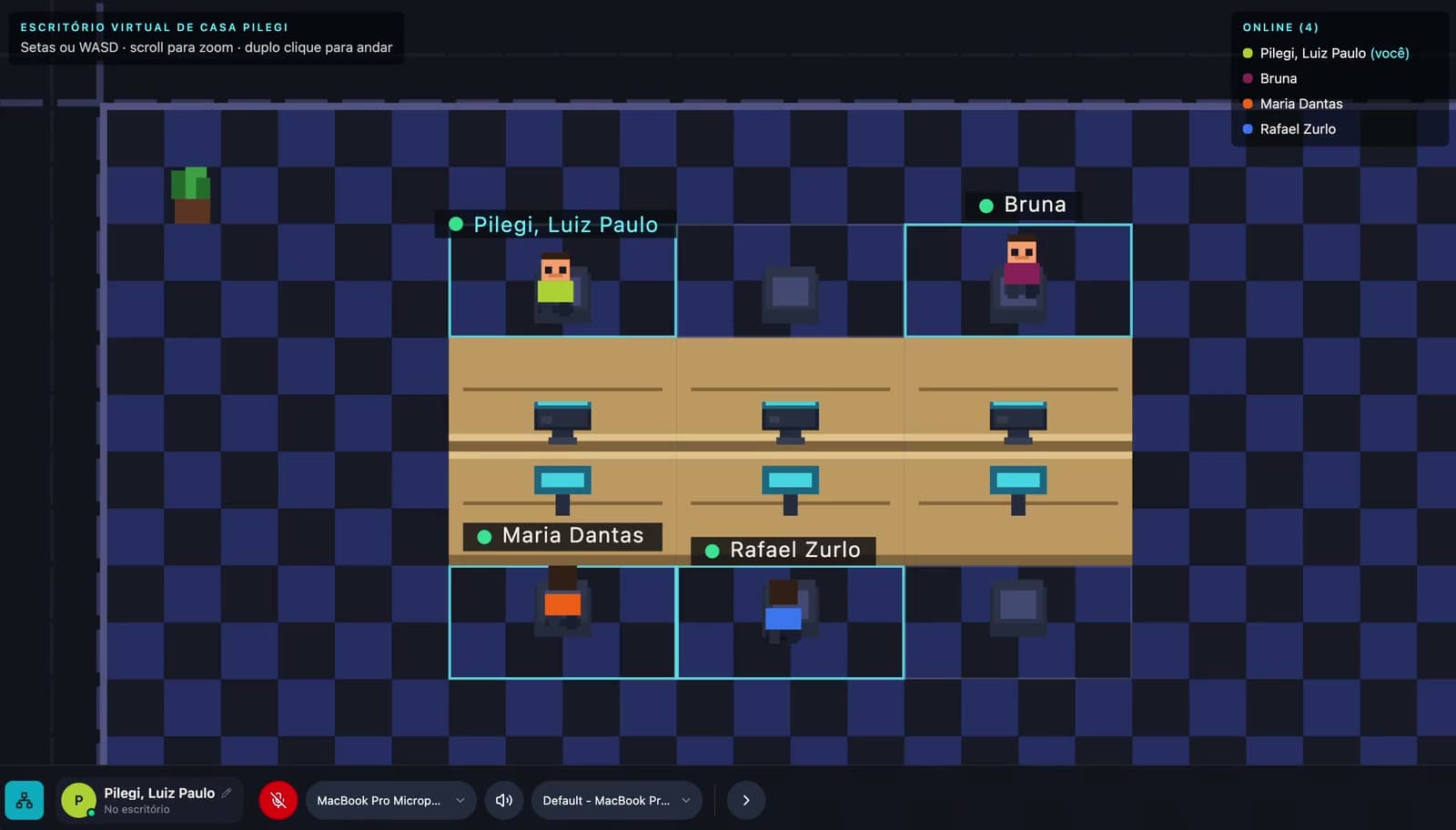
The idea is simple: everyone opens the virtual office, including the people who went in. That way the map shows the whole team, and the conversations that matter happen in a place everyone can reach equally.
Presence everyone can see
In Capitown, everyone has an avatar and a desk on the map, and the people list shows who is in the office and each person’s status. A custom status with an emoji adds context, like “🏢 In the office today” or “🏠 At home, focusing until 11”. Someone across town can tell at a glance who is free to talk.
Quick conversations do not depend on being in the same building
To ask a question, you walk to your teammate’s desk on the map and open the call with one click or the J key, with camera and screen sharing if needed. For someone far away on the map, a wave lets them know you want to talk. It does not matter whether your teammate is at home or in the office: the path is the same.
Team rituals in one place
The daily standup and the weekly sync can happen in the map’s meeting room, where everyone who walks in talks together. When each person joins from their own computer, nobody is stuck “on the screen side” and everyone has the same voice in the conversation.
The team organized on the map
Admins set up desk clusters for each team and open rooms for group conversations. Each person claims their own desk and decides how it looks. The result is a picture of the team that does not depend on who is in which building.
6 agreements to make hybrid work
- 1Everyone on the map, including in the office. If only people at home open the virtual office, it becomes the “remote people’s” place.
- 2One person, one computer. In team meetings, everyone joins from their own computer, even when they share a physical room.
- 3Hallway decisions go to chat. What was decided in the office kitchen becomes a message in the channel for those who were not there.
- 4Your status says where you are. A simple emoji in your custom status saves the “are you in the office today?” question.
- 5Focus has a signal. Do not disturb works at home and in the office. People who need to concentrate say so without vanishing from the map.
- 6Office days with a purpose. Use in-person days for what works best face to face, like planning and onboarding, and keep the day-to-day in the virtual office.
What to consider as a team in Brazil
Most virtual offices were born outside Brazil, built first for other languages and other realities. For a Brazilian team, a few points make a difference every day:
- A Portuguese interface. A tool everyone uses all day needs to speak the team’s language, including for people who do not read English. Capitown’s interface is available in Portuguese and English.
- Data handled under the LGPD. Presence and conversations are your team’s data. Capitown handles personal data in line with Brazil’s General Data Protection Law (LGPD), and the details are on the security page.
- Billing in reais. Capitown plans are charged in Brazilian reais (R$).
- Support in Portuguese. Support is by WhatsApp and email, in Portuguese, with the team building Capitown in Curitiba.
Presence without surveillance
In hybrid work, it is tempting to use online presence to check who is working at home. That destroys the trust the model depends on. In Capitown, the map shows who is nearby and their status, and nothing more: no screenshots, no click counting, no recorded conversations. To agree on how your team uses status, see our guide to status in remote work.
How to get started with a hybrid team
- 1Create the space and set up desk clusters for each team.
- 2Invite everyone, people at home and people who go into the office. Invites expire and set the Member or Admin role.
- 3Ask everyone to claim a desk and install the Mac or Windows app, so the office is always one click away.
- 4Agree on rituals: daily standup in the map’s meeting room and decisions recorded in chat.
Conclusion
Hybrid work works when the team has a shared place, and that place cannot depend on who went into the office that day. A virtual office brings everyone onto the same map, with visible presence, quick conversations, and the same rituals for all. For the gains in detail, read 7 benefits of a virtual office for remote and hybrid teams, and if your team’s calendar is packed too, see how to reduce Zoom and Meet meetings. To start with a pilot, use how to adopt a virtual office in 14 days; to compare options, see how to choose virtual office software.
Frequently asked questions
Does a virtual office work for a hybrid team?
Yes, as long as everyone uses it, including people in the office. That way the map shows the whole team and conversations happen in a place everyone can reach in the same way.
Do people in the physical office need to join Capitown too?
It is recommended. If only people at home join, the virtual office becomes the remote people’s place. With everyone on the map, people at home can see who is available in the office and vice versa.
How do you make hybrid meetings fairer?
Hold them in the map’s meeting room, with each person on their own computer. That way nobody is stuck on the screen side and everyone takes part in the same way.
Is Capitown available in Portuguese?
Yes. The interface is available in Portuguese and English, and support by WhatsApp and email is in Portuguese.
Does Capitown comply with the LGPD?
Yes. Capitown handles personal data in line with Brazil’s General Data Protection Law. Calls are encrypted in transit and nothing is recorded.