Remote and hybrid work are here to stay. They brought more autonomy, no commute, and access to talent from anywhere. But along the way, many teams lost something hard to measure: the feeling of being together. The quick question across the desk, the coffee chat that turns into an idea, the new hire who learns just by overhearing the conversation next to them.
That is where a virtual office comes in. In this article we explain what it is, why it is different from yet another video call tool, and the main benefits for remote and hybrid teams.
What is a virtual office?
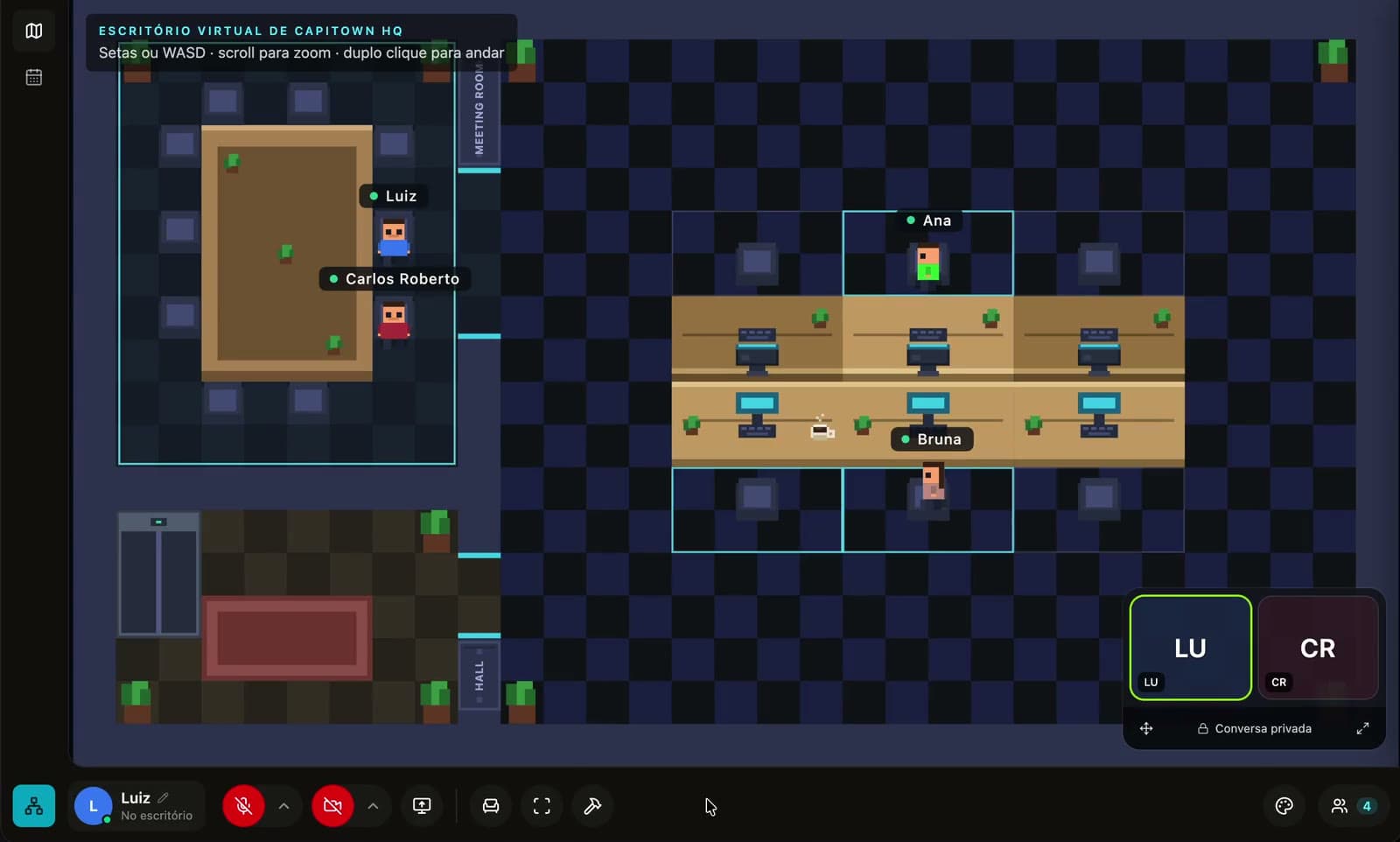
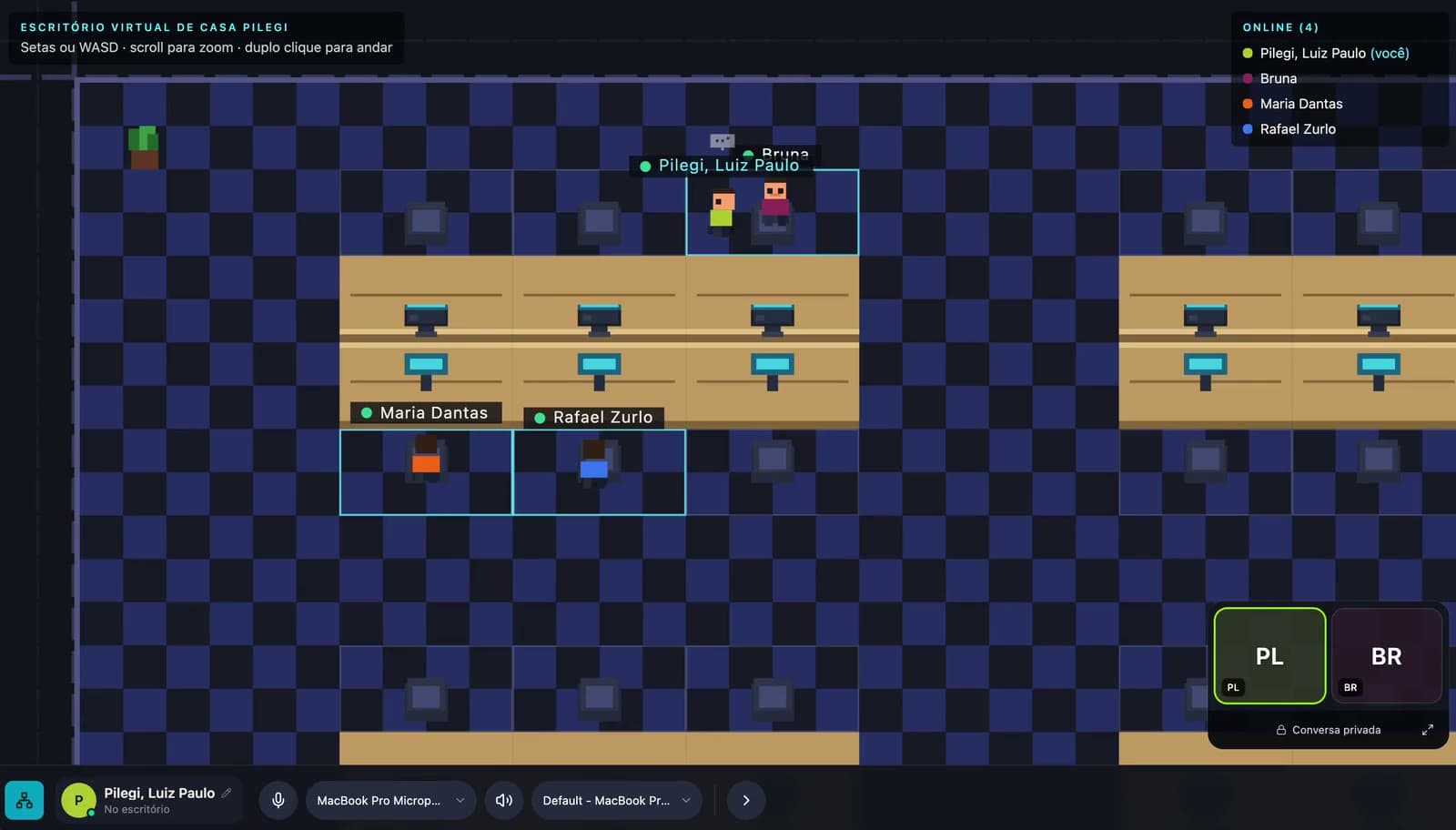
A virtual office is a persistent digital space where your team “hangs out” during the workday. Instead of each person only existing when they join a meeting, everyone shows up in the same place: you can see who is online, who is busy, and who is free for a chat.
In Capitown, that space is a live pixel-art map. Everyone has an avatar, sits at their own desk, and moves around the office. Walk up to someone and a voice conversation starts; walk away and it ends. No link, no calendar invite, no “can I call you?”. For the full definition, with a comparison and what to look for, see the guide what is a virtual office.
Quick note: “virtual office” sometimes refers to a business address and mail-handling service. Here we mean a collaborative virtual office, the online place where your team works together.
What remote and hybrid teams miss
Most remote work tools were built for two extremes: async chat (messages that can wait) and scheduled meetings (conversations with a set time). The trouble is everything in between:
- The two-minute question that turns into a twenty-message chat thread.
- The 30-minute meeting booked for something that would fit in a hallway chat.
- No visibility: nobody knows if a teammate is focused, in a meeting, or free.
- Isolation for people working from home who only talk to the team in formal meetings.
- In hybrid setups, a split between the people at the office and the people at home.
A virtual office fills exactly that gap: synchronous, spontaneous communication, the kind that happened naturally when everyone shared the same floor.
7 benefits of a virtual office for your team
1. Visible presence, without surveillance
A glance at the map answers “who can help me right now?” in a second. It is the same information you would get by looking around the room, not a productivity tracker: no screenshots, no click counting, no activity reports. Presence is there to make it easy to meet, not to monitor.
2. Quick conversations, no meeting needed
Instead of sending “got 5 minutes?” and waiting, you walk to your teammate’s desk and talk. That unblocks small decisions that often sit for hours in remote teams. In Capitown, the call starts by proximity and ends when someone walks away, just like a hallway chat.
3. Fewer meetings, lighter calendars
When talking to someone is easy, many meetings stop being necessary. Quick syncs, two-minute reviews, and the classic “just one question” drop off the calendar. You get longer stretches of focus time, and the meetings that remain get shorter and sharper.
4. Stronger connection and team culture
Culture is built in small moments: the joke before a meeting, the “good morning” when you arrive, the celebration when something ships. A shared map creates a common place for those moments to happen. Custom avatars and personalized desks help the team recognize each other and feel they work together, not just in parallel.
5. Friendlier onboarding
For new hires, remote work can feel lonely: there is no way to “see how the team works”. In a virtual office, newcomers know where everyone sits, see who is available, and can start a conversation without having to book a call with someone they barely know. Asking questions feels natural, and people ramp up faster.
6. Hybrid teams in one place
The biggest risk of hybrid work is ending up with two teams: the office crowd and the home crowd. When everyone is also on the map, people at home keep seeing and talking to people at the office, and vice versa. The virtual office becomes the meeting point no matter where anyone is that day.
7. Protected focus and less noise
It sounds counterintuitive, but being “together” online can mean fewer interruptions. With proximity conversations you only hear the people near you, not a whole channel. You can step away to work quietly and, when you need to, walk over to whoever can help. Fewer scattered notifications, more conversations in the right place.
Virtual office vs. video call vs. chat
A virtual office does not replace chat or video calls: it covers the space between them. Here is where each one fits:
| Chat | Video call | Virtual office | |
|---|---|---|---|
| Best for | Announcements and topics that can wait | Planned meetings with an agenda | Quick conversations and day-to-day presence |
| How it starts | A message, then waiting for a reply | A link and a calendar invite | Walking up to someone at their desk |
| Knowing who is free | Manual status, often out of date | Not shown | Visible on the map in real time |
| Sense of team | Low | Only during the meeting | Ongoing throughout the workday |
How to roll out a virtual office with your team
The technology is the easy part. What makes a virtual office stick is the agreement between people. A simple playbook that works well:
- 1Start with a pilot team. Pick a small, enthusiastic team to try it for two weeks.
- 2Build a map that feels like your company. Desks by team, a meeting room, and a common area for coffee.
- 3Agree on how to use it. For example: be on the map during work hours, and walking up to someone’s desk means “can we talk?”.
- 4Swap short meetings for desk visits. Review the calendar and cut the syncs that fit in a quick chat.
- 5Keep async for async work. Docs, decisions, and announcements stay in chat and your usual tools.
- 6Collect feedback and adjust. After the pilot, ask what improved and what got in the way, then expand to other teams.
“The goal is not to be online all the time. It is to make it easy to find people when the work calls for it.”
What about security and privacy?
Before moving your team to any tool, check how it handles conversations and data. In Capitown, audio is encrypted in transit, conversations are never recorded, each map is an isolated space that only invited people can join, and data processing follows Brazil’s data protection law (LGPD). See the security section and the Privacy Policy for details.
Conclusion
Remote and hybrid teams do not have to choose between flexibility and closeness. A virtual office brings back presence, spontaneous conversation, and a sense of team, without sending anyone back into traffic and without packing the calendar with meetings.
To choose with clear criteria, see how to choose virtual office software and our Gather Town alternative. To start small, follow how to adopt a virtual office in 14 days.
If you want to try it with your team, Capitown offers a 14-day free trial. It runs in the browser and in the desktop app for Mac and Windows.
Frequently asked questions
What is a virtual office for teams?
It is a persistent digital space where the team stays during the workday. Everyone shows up in the same place, you can see who is available, and you can start a conversation right away without scheduling a meeting.
How is a virtual office different from a video call?
A video call is a room with a set time that only exists during the meeting. A virtual office stays open all day: it shows who is nearby and allows quick, spontaneous conversations, like a physical office.
Does a virtual office work for hybrid teams?
Yes. When everyone is on the map, people at home and people at the office keep seeing and talking to each other, which prevents a split between the two groups.
Does a virtual office track team productivity?
Not in Capitown. The map shows presence, like you would see by looking around the room, but it does not take screenshots, count clicks, or record conversations.