In short
- A one-time meeting room is a virtual meeting space created for a single event or session, with its own link and access settings.
- A permanent room stays available, with the same access, for meetings that repeat with the same group.
- External, sensitive or one-off events usually fit a one-time room. Daily team rituals fit a permanent room, and a virtual office adds presence around it.
What is a one-time meeting room?
A one-time meeting room, sometimes called a virtual conference one-time room, is a temporary online meeting space created for one specific event: a webinar, a client demo, an interview or a training session. The organizer sets who can join, sends a link created for that event and, once it is over, the room is no longer used. Yealink describes it the same way in its guide to what a virtual conference one-time room is.
Each tool implements the idea in its own way. GoTo Meeting, for example, explains in its meeting types that one-time meetings have IDs that expire 30 days after the start date, while its meeting rooms never expire and suit recurring sessions such as daily stand-ups.
What is a permanent room?
A permanent room (also called a persistent or reusable room) keeps the same address and access over time. The same group meets there again and again: the weekly sync, office hours, the daily stand-up. Nobody has to hunt for this week’s link.
One-time vs permanent: the differences
| One-time meeting room | Permanent room | |
|---|---|---|
| Purpose | A specific event or session | Meetings that repeat |
| Who joins | Often guests from outside the team | Usually the same team |
| Link | Created for the event | Stays the same |
| Settings | Chosen for that event | Standard, reused |
| After the meeting | The room is no longer used | The room stays available |
| Typical examples | Webinar, client demo, interview, training | Daily stand-up, weekly sync, office hours |
When to use a one-time room
- Outside guests. Clients, candidates and partners do not belong in your team’s space. A room made for the event keeps access limited to that session.
- Sensitive conversations. Lifesize, for instance, suggests one-time rooms for sales demos, interviews and meetings with sensitive material.
- Events with their own format. A webinar or a large presentation has its own registration, agenda and settings.
- A single session. If the group will not meet again, a permanent room only adds clutter.
When to use a permanent room
- Team rituals. The daily stand-up, the weekly sync, the retro. Same people, same rhythm.
- Office hours. A place where anyone can drop in at a known time.
- Recurring syncs between two teams. The link stops being a thing to remember.
The warning sign is the opposite case: when a recurring internal meeting gets a new link every week, time is lost before it even starts.
The third option: rooms inside a virtual office
A permanent room still has one limit: it only exists when someone opens it, and you cannot see who is about to come in. A virtual office goes one step further. The room is part of a place where the team already is during the day.
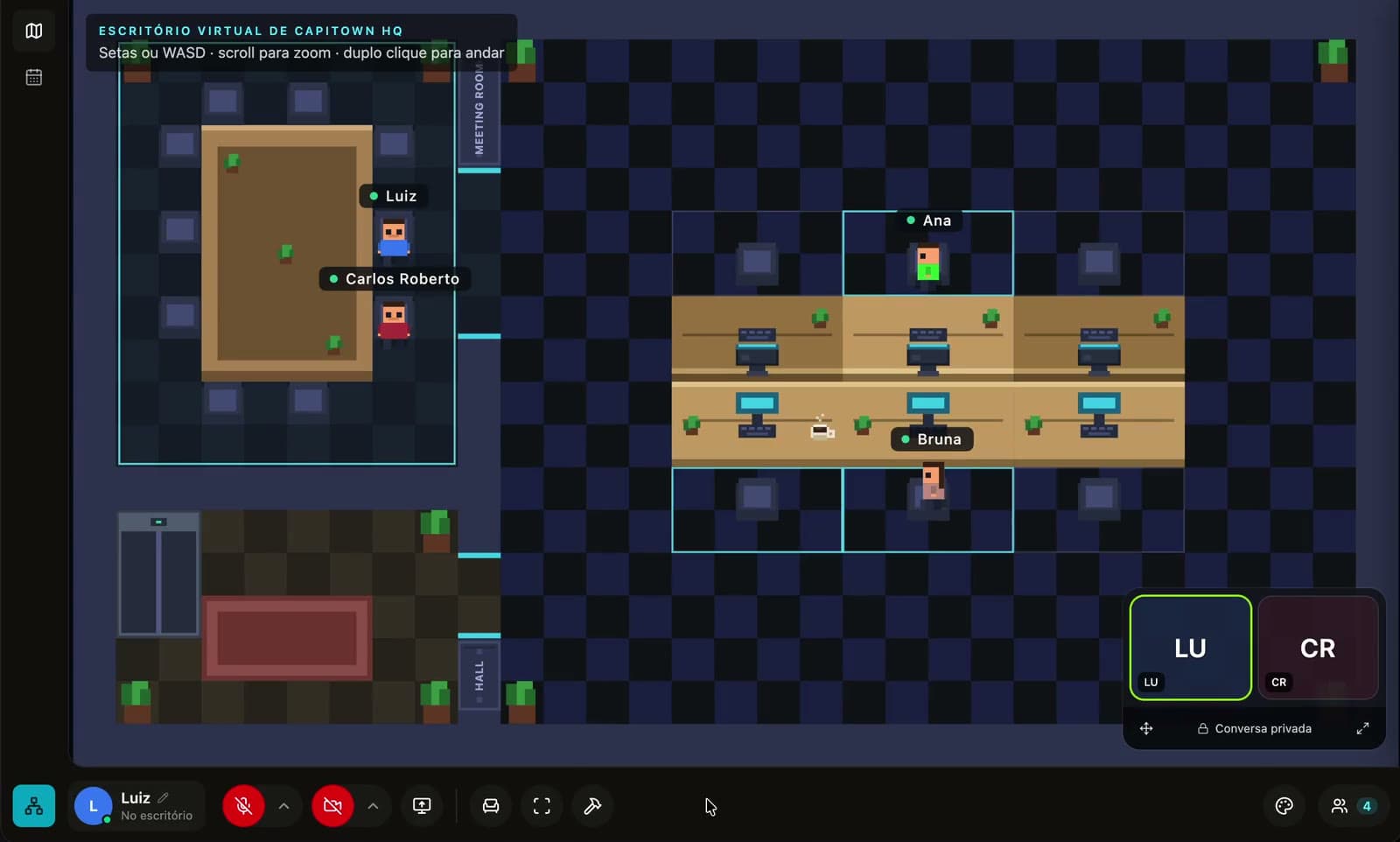
In Capitown, the map has a meeting room. Everyone who walks in joins the same call, with camera and screen sharing when needed, and there is no link to send. Before the daily stand-up, you can already see who is at their desk. After it, people walk back to their desks, and follow-up questions become short conversations at someone’s desk. We cover that pattern in how to reduce Zoom and Meet meetings.
The room on the map is permanent, but the call is not. When everyone leaves, the call room is closed, and Capitown does not record or store audio or video. Only people who have an account and were invited to the space can enter, and each team’s map is isolated from the others. Details are on the security page.
Map-based platforms also use one-time formats: Gather, for example, presents its Classic version as best for “virtual conferences and one-time events” on its get-started page.
What stays in a one-time room
A virtual office is built for the team, not for events with outside guests. Client meetings, interviews, webinars and large presentations still belong in a video call tool with a one-time link. That is not a limitation to hide: it is a split that keeps your team’s space private. We explain it in Capitown, Slack, Google Meet and Zoom.
How to decide in 30 seconds
- 1Will the same people meet again? If not, use a one-time room.
- 2Is anyone joining from outside the team? If yes, use a one-time room in your video call tool.
- 3Is it a recurring internal ritual? Use a permanent room, ideally inside the place where the team already works.
- 4Is it a two-minute question? It does not need a room. See quick meeting.
Checklist for a safe one-time room
- Create a new link for the event instead of reusing a personal one.
- Decide who can join and how they are let in.
- Share the link only with the people on the list.
- Agree in advance whether the session will be recorded, and tell participants.
- Close the room when the event ends.
Conclusion
One-time and permanent rooms solve different problems. Use one-time rooms for events, outside guests and sensitive one-off conversations. Use a permanent room for the rituals that repeat. If your team spends the whole day apart, put that permanent room inside a virtual office, where the meeting is one step from everyone’s desk. To see how that works, read what a virtual office is.
Frequently asked questions
What is a one-time meeting room?
It is a temporary virtual meeting space created for one specific event, such as a webinar, demo, interview or training session, with its own link and access settings. After the event, it is no longer used.
What is the difference between a one-time room and a permanent room?
A one-time room is created for a single event and usually includes outside guests. A permanent room keeps the same address and access for meetings that repeat with the same group.
When should I use a one-time room?
For outside guests, sensitive conversations, webinars and any session that will not repeat with the same people.
Is a permanent room safe for recurring meetings?
It can be, as long as access is limited to the team. In a virtual office such as Capitown, only invited people with an account can enter the space.
Does Capitown have meeting rooms?
Yes. The map has a meeting room where everyone who walks in joins the same call, with camera and screen sharing, and no link is needed. Capitown does not record or store audio or video.
Can I use Capitown for events with outside guests?
Capitown is built for your team’s day-to-day. For webinars, client meetings and interviews, use a video call tool with a one-time link.