Short answer
Capitown is a Gather Town alternative for teams that want a simpler live map: walk up to a desk to talk, Do Not Disturb, a meeting room, and calls that are not recorded, with an interface in English and Portuguese. Gather is the better fit if you need recording, AI notes, integrations, guests, or a highly customizable office. Details and sources below.
Gather is a well-known virtual office: a map where a team can see each other, walk over, and talk without booking a meeting for every question. If you are looking for a Gather Town alternative, the useful question is not “which tool is best in the abstract.” It is what Gather offers today, what we cover at Capitown, and which routine each one fits.
We are the team behind Capitown, so read this knowing which side we are on. We checked Gather’s features on the official site, the pricing page, the help article Understanding Gather’s pricing changes (2025), the download page, and G2, on 11 November 2026 (Brasília time). What we say about Capitown is on our own features, security, and download pages. Please check Gather’s official pages before you decide: their product may have changed since then.
If the term still feels loose, start with what a virtual office for remote teams is. In this article it means an online workplace for collaboration, not a business address.
Why people search for a Gather Town alternative
On 15 September 2025, Gather announced that it would no longer offer a permanent free plan on Gather 1.0 or Gather 2.0, and it launched Gather 2.0. The source is the official article Understanding Gather’s pricing changes (2025).
That does not make Gather a poor product. It remains a full-featured platform, and the homepage and pricing page describe a 30-day trial. It does change the reason for the search: teams that used a free space, or that want to compare billing models and features, started looking at other options.
A real alternative still has to solve the same problem: a persistent place for a remote or hybrid team, with visible presence and spontaneous conversation. Without that, a switch does not hold.
Gather Town, Gather 2.0 and Gather 1.0: which one people mean
Many people search for “Gather Town”, after the gather.town domain. On its own site, the product is called Gather, and it comes in two versions:
- Gather 2.0 is the current platform, “built for remote teams working together every day in a virtual office”, according to Gather’s get-started page.
- Gather 1.0 (Classic) is the original platform. It remains available, and the same page describes it as “best for virtual conferences and one-time events”. The Gather 1.0 help center says 2.0 has a new interface and more integrations.
When we compare in this article, “Gather” means Gather 2.0 unless we say otherwise.
Switching from Gather: a 5-step checklist
- 1List what you really use in Gather today. Recording, AI notes, calendar sync, guests? If any of these is essential, read our “what we do not have” list before going further.
- 2Pick one pilot team. A group that already works together, not the whole company.
- 3Rebuild only what matters. In Capitown, that means desks for the people, the meeting room for rituals, and a status agreement. A custom map layout for larger teams is arranged through support.
- 4Agree on focus. Decide when people are expected on the map and how to treat Do Not Disturb. See status in remote work.
- 5Run both for a short period. Then decide with the team, following the 14-day plan.
What Gather does well
Based on the official pages checked on 11 November 2026, Gather 2.0 is a virtual workspace where you can see who is free, focused, or in a meeting, wave, hear nearby conversations, and join in a click. There is a simplified view and Mini Mode so you can stay connected while you use other apps. The microphone starts muted; the camera does not have to stay on all day.
On the pricing page, Gather lists, among other features: unlimited meetings and chat (channels, DMs, threads), screen sharing, meeting recording, transcription and AI notes, Google Calendar sync, GitHub and Spotify integrations, office customization (templates, floor plans, desks, and the Gather Studio editor, also described on the Portuguese product page), Admin, Member, and Guest roles, and playful extras such as avatars, desks, a gong, and built-in games.
There is a desktop app for Mac and Windows, for both Gather 2.0 and Gather 1.0, on the download page. Gather 1.0 (Classic) remains available for teams that already use it, according to the official homepage FAQ. The download page also lists an iOS app and a Chrome extension (checked 23 November 2026).
Gather 2.0 is billed per member (your team, not guests). Gather 1.0 is billed on concurrent users. That is stated on the pricing page and in the help article above. We do not reproduce amounts here; read them on Gather’s site on the day you decide.
On G2, as of 11 November 2026, Gather was listed at 4.8 out of 5 from 374 reviews. The product profile lists English, Japanese, and Portuguese (Brazil), and Gather maintains a Portuguese site. Reviewers often praise the ability to walk up to a teammate’s desk. Some report lag, high CPU and memory use, or a warm machine when audio, video, and screen sharing run together; others mention a learning curve or discomfort with a game-like look. Those are user reports, not a test we ran.
What we do at Capitown — and what we do not
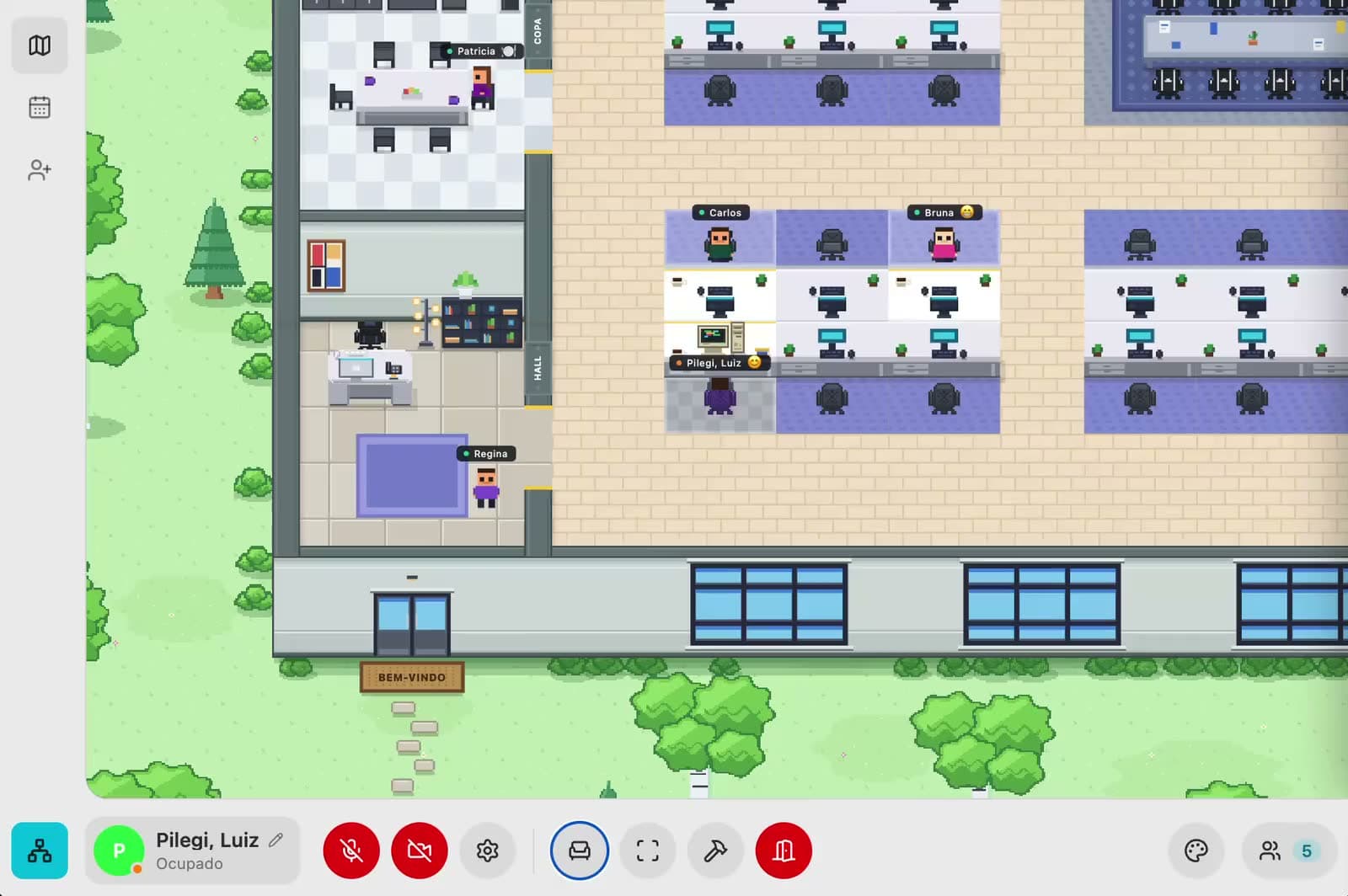
Capitown is also a 2D-map virtual office. We built it for remote and hybrid teams: each person appears as a pixel-art avatar, walks with the arrow keys, WASD, or the mouse, sits at a desk, and talks with whoever is nearby.
Today, this is what your team finds on the map (the full list is on our features page):
- Proximity chat: a voice call starts when you walk up to a desk and ends when you walk away.
- An optional camera and screen sharing in the same conversation.
- A meeting room on the map, for the whole team.
- Team chat, with a general channel and direct messages.
- A wave with a notification, including in the app.
- Do Not Disturb: you stay visible on the map, but nobody pulls you into a call.
- A customizable desk and map themes.
- Time-limited invites, with Member and Administrator roles.
You open the office in the browser or in our desktop app. Today the Mac app needs Apple Silicon (M1 or newer) and macOS 12 or later; the Windows app needs 64-bit Windows 10 or 11. On an Intel Mac, use the browser for now. The Linux app is not out yet: it is on the way.
Our security page comes down to this: audio runs over WebRTC with encryption in transit (DTLS-SRTP); we do not record or store audio or video; only invited, signed-in people can enter; each team’s map is isolated from the others; and we handle personal data under Brazil’s LGPD. The interface is available in Portuguese and English, and our WhatsApp and email support is in Portuguese.
We charge per space, not per person. We do not list amounts in this article. The team trial lasts 14 days.
What we do not have today: AI notes or transcription, meeting recording, Google Calendar, GitHub, or Spotify integrations, an advanced map editor, extra floors, a Guest role, built-in games, or a mobile app. We would rather say so here than have you find out halfway through a trial.
That difference matters. If your team depends on recording the daily standup and getting an automatic summary, Gather offers that and we do not. If the priority is a simpler map, walk-up conversation, and calls that are not recorded, the fit runs the other way.
Side-by-side comparison
The table sums up what Gather documents on its site and what we offer today. It is not a score, and it is not a performance promise.
| Gather (official site, 11 Nov 2026) | Capitown (our product, 11 Nov 2026) | |
|---|---|---|
| Product type | Map-based virtual office, with presence and spontaneous talk | Live-map virtual office, with presence and spontaneous talk |
| How a conversation starts | Walk up, wave, or join in a click; you can hear what is happening nearby | Walking up to a desk starts a voice call; a click or the J key also opens it |
| Chat | Channels, DMs, threads, meeting and nearby chat, per the pricing page | A general channel and direct messages |
| Meetings | In-space meetings, screen sharing, recording, transcription, and AI notes | A meeting room on the map, optional camera, and screen sharing; no recording |
| Customization | Templates, Gather Studio, desks, avatars, and objects; playful extras (gong, games) | Pixel-art avatars, a customizable desk, and map themes |
| Documented integrations | Google Calendar, GitHub, Spotify, Chrome extension | We do not have integrations yet |
| Where it runs | Browser; desktop app for Mac and Windows; iOS mobile app (Android announced as coming soon); Chrome extension (download page, 23 Nov 2026) | Browser; desktop app for Mac (Apple Silicon) and Windows; Intel Macs in the browser; Linux coming soon |
| Access | Invite; Admin, Member, and Guest roles | Time-limited invites; Member and Administrator roles |
| Recording | Recording and transcription listed on the pricing page | We do not record or store audio or video |
| Language and support | Portuguese marketing site; G2 lists English, Japanese, and Portuguese (Brazil) | Interface in Portuguese and English; WhatsApp and email support in Portuguese; data handled under the LGPD |
| Billing model | Gather 2.0: per member. Gather 1.0: concurrent users. No permanent free plan since 15 Sep 2025; 30-day trial | Per space; 14-day trial. Amounts: see each product’s site |
| Public reviews | 4.8/5 from 374 reviews on G2 (11 Nov 2026) | We do not have a comparable volume of public reviews to cite yet |
Who each one is usually better for
Gather tends to be the better fit when a team wants a highly customizable office, with a map editor, objects, and a more playful tone; when it needs recording, transcription, or AI notes; when calendar, GitHub, or Spotify integrations are part of the daily workflow; or when it is already on Gather 1.0 and wants to stay in that ecosystem, including Classic events, as their documentation describes.
Capitown, our product, tends to be the better fit when a team wants a leaner live map, focused on seeing who is at a desk and talking on the spot; when it prefers conversations not to be recorded; when a Portuguese and English interface, Portuguese-language support, and LGPD are decision criteria; when a desktop app for Mac (Apple Silicon) or Windows (or the browser, including on Intel Macs) is enough; and when per-space billing fits better than per-member billing.
Neither one replaces Slack, Zoom, or Google Meet. The virtual office covers short conversations and presence; chat and calls with people outside the team stay where they are. We go into that in Capitown, Slack, Google Meet, and Zoom and in how to reduce Zoom and Meet meetings.
If you only need a room for one-off events, see one-time meeting room vs permanent room.
How to try an alternative without turning the team upside down
Do not move the whole company on day one. Pick a group that already works together, agree on what you want to watch (for example, quick questions without a booked call), and use a short plan. Our 14-day guide walks through that: set up the space, agree on focus, try real work, and only then decide whether to continue, adjust, or stop.
If you are still comparing criteria (privacy, language, billing model, what a conversation needs), how to choose virtual office software is the calmer place to build that list.
Sources (accessed 11 and 23 November 2026, Brasília time)
- Gather, Gather pricing, Gather download, Gather virtual office in Portuguese
- Understanding Gather’s pricing changes (2025)
- Gather on G2
- Gather: Get started and Gather: Download (accessed 23 November 2026)
- What is Gather 1.0? Gather Help Center (accessed 23 November 2026)
- Our own Features, Security, and Download pages
Frequently asked questions
Is Capitown a free Gather alternative?
No. We do not have a permanent free plan. Gather ended that kind of plan on 15 September 2025, according to its official help center, and it still offers a 30-day trial. We offer a 14-day trial. For current amounts and terms, check both sites. If your team needs an open-ended free option or self-hosting, look at other tools on the market — and read what each plan actually includes.
Is Capitown a Gather clone?
No. We start from the same idea (a map with presence and proximity conversation), which several platforms use. But we built Capitown our own way: a simpler scope, an interface in Portuguese and English, and a decision not to record conversations.
Can I use Capitown instead of Gather on the same day?
You can create the space, invite a group, and start walking the map quickly. What takes more than a day is the team agreement: when to be in the space, how to respect Do Not Disturb, and what still belongs on Zoom or in chat. We wrote the 14-day guide for that.
Does Capitown have the same integrations as Gather?
No. Gather’s site lists Google Calendar, GitHub, and Spotify. We do not have those integrations yet. If one of them is a must-have for your team, weigh that in the decision.
Is Gather available in Portuguese?
Yes. There is a Portuguese page, and G2 lists Portuguese (Brazil). Our difference on this point is that Capitown was born in Brazil: the interface is in Portuguese and English, our WhatsApp and email support is in Portuguese, and we handle data under the LGPD.
Does Capitown provide a virtual business address?
No. “Virtual office” in this article means collaboration software. We do not provide a legal address, mail handling, or company domicile.
Does Gather have a Linux app?
As of 23 November 2026, Gather’s download page lists desktop apps for macOS and Windows, an iOS app and a Chrome extension, but no Linux app. Capitown runs in the browser on Linux, and our Linux desktop app is coming soon.
Is Gather Town the same as Gather?
Yes. Many people call it Gather Town because its website is gather.town, but on its own site the product is called Gather. It comes in two versions, Gather 2.0 and Gather 1.0 (Classic).