Open any remote team’s calendar and count the 15- or 30-minute meetings called “quick sync”, “catch-up”, or “question about X”. Many of them did not need an agenda, an invite, or a link. They became meetings because, in remote work, there is no other obvious way to talk right now.
In this article we show how to separate the meetings worth having from the ones that just take up space, and how presence in a virtual office replaces many of them with short conversations, without losing touch with the team.
Why a remote team’s calendar fills up
In a physical office, most conversations never made it to the calendar. Someone turned their chair, asked, and went back to work. Remotely, you are left with two doors: chat, which can be slow, and video calls, which need an invite. Without a middle ground, “just one question” becomes an event.
- Every conversation needs a link. To talk by voice, someone creates a room, sends the invite, and waits for the other person to join.
- Nobody knows who is free. Without seeing a teammate, booking a slot feels safer than calling now.
- Meetings become the way to see the team. When the only contact is on calls, people schedule calls so they do not feel alone.
- Chat stalls. The two-minute question turns into a long thread, and someone suggests “shall we book 15 minutes?”.
The result is familiar: days chopped up between calls, little time for focus, and the fatigue of spending hours looking at a grid of faces.
Which meetings you can take off the calendar
Not every meeting is a waste. The useful question is: did this conversation need a scheduled time?
| Type of conversation | Needs a meeting? | Where it can happen |
|---|---|---|
| Quick question for a teammate | No | At their desk, in the virtual office |
| Reviewing work together | Rarely | At the desk, with screen sharing |
| Daily standup and team sync | Needs a time, not a link | In the map’s meeting room |
| Update that can wait | No | In chat |
| Client meeting or interview | Yes | On Zoom or Meet |
| Presentation for many outside guests | Yes | On Zoom or Meet |
Presence instead of meetings
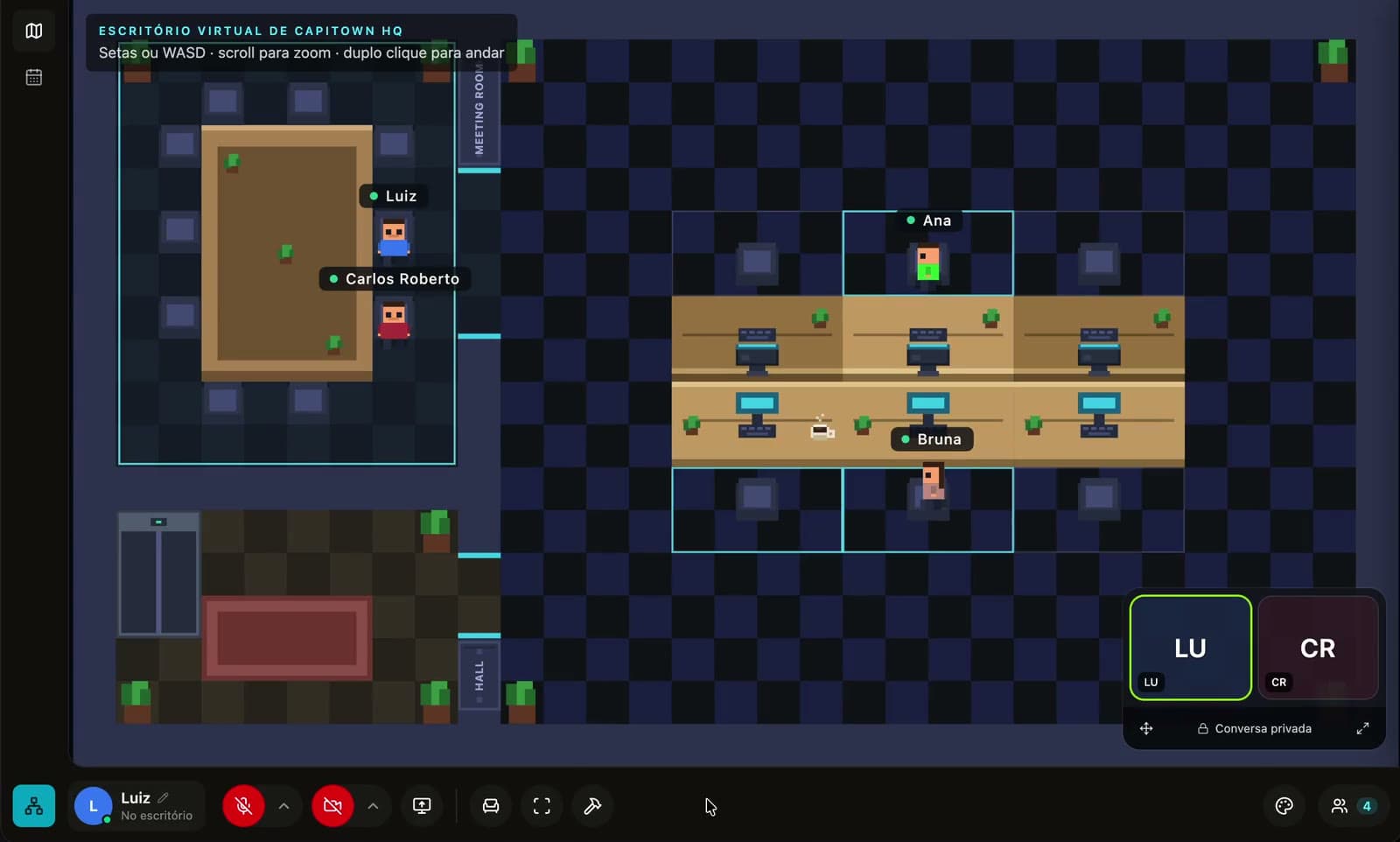
A virtual office does not make meetings disappear by magic. It creates the missing middle ground: a place where you see who is available and reach them in seconds. In Capitown, it works like this:
Walk over instead of sending a link
To talk to someone, you walk to their desk. An invite to talk appears and, with one click or the J key, the voice call opens. If you need to show something, turn on your camera or share your screen right there. When you are done, just walk back to your desk.
See before you call
The map and the people list show everyone’s status: Active, Busy, Away, or Do not disturb, plus a custom status with an emoji. You know whether you can call now before interrupting, and you do not need to book a slot “just in case”. We show how to agree on this with your team in our guide to status in remote work.
Wave at someone far away
If the person is on the other side of the map, a wave lets them know you want to talk, with a notification even when the tab is in the background. They decide when to come over. People set to Away or Do not disturb do not receive waves.
Team rituals in the map’s meeting room
The daily standup and the weekly sync still have a time, but they do not need a link. Everyone walks to the meeting room, and whoever is inside talks together. That is one less event to create and one less link to hunt for.
5 team agreements to cut meetings without losing touch
- 1Call before you book. If the person is Active on the map, walk to their desk. Meetings are for when you need an agenda or outside guests.
- 2Quick syncs stay off the calendar. If it fits in ten minutes, it fits in a conversation at the desk.
- 3Daily standup in the map’s room. Same time as always, no link, no delay getting in.
- 4Decisions go to chat. What was decided in a short conversation becomes a message in the channel, so there is a record.
- 5Respect focus. Do not disturb means the conversation can wait. Send a message and call later.
When to keep Zoom and Meet
Cutting meetings does not mean dropping video calls. They are still the right tool for clients, interviews, partners, and events with many outside guests who are not part of the team’s space. The virtual office takes the everyday internal conversations. We explain this split in Capitown, Slack, Google Meet and Zoom: why one does not replace the other.
For one-off events with outside guests, see one-time meeting room vs permanent room.
“The best short meeting is the one that becomes a two-minute conversation at a teammate’s desk.”
How to tell whether it worked
You do not need a dashboard. Compare the team’s calendar before and after a few weeks:
- How many short internal meetings does each person have per week?
- How many focus blocks of two hours or more are left on the calendar?
- Are questions solved the same day, or do they become a meeting tomorrow?
- Do recent hires talk to the team outside formal meetings?
Conclusion
A remote team’s packed calendar is not a lack of discipline: it is the lack of a place to talk right away. With visible presence, clear status, and conversations that start when you walk over, many short meetings stop being necessary. Zoom and Meet stay for what really needs them. Want the full picture? Read what is a virtual office. To try the idea with a small group, follow how to adopt a virtual office in 14 days. And if your team already uses another map, see our Gather Town alternative.
Frequently asked questions
Does a virtual office get rid of meetings?
No. It takes short internal conversations off the calendar, and they happen at a teammate’s desk or in the map’s meeting room instead. Client meetings, interviews, and events stay on Zoom or Meet.
How do I start a conversation in Capitown without booking a meeting?
Walk to the person’s desk on the map. An invite to talk appears and, with one click or the J key, the voice call opens. You can turn on the camera and share your screen in the same conversation.
Can we run the daily standup in Capitown?
Yes. The standup can happen in the map’s meeting room: everyone who walks in talks together, with no link needed.
What if the person is focused?
Their status shows it before you call. People set to Do not disturb or Away do not join conversations or receive waves, so the question goes to chat instead.
Do I need to cancel Zoom or Google Meet?
No. They are still the best choice for meetings with people outside the team. Capitown works alongside them.
Is a virtual office a Zoom alternative?
It is an alternative for short internal conversations, not for every video call. Client meetings, interviews, and events stay on Zoom or Meet. The map is there so you do not have to book a call for every question. See Capitown, Slack, Google Meet, and Zoom.