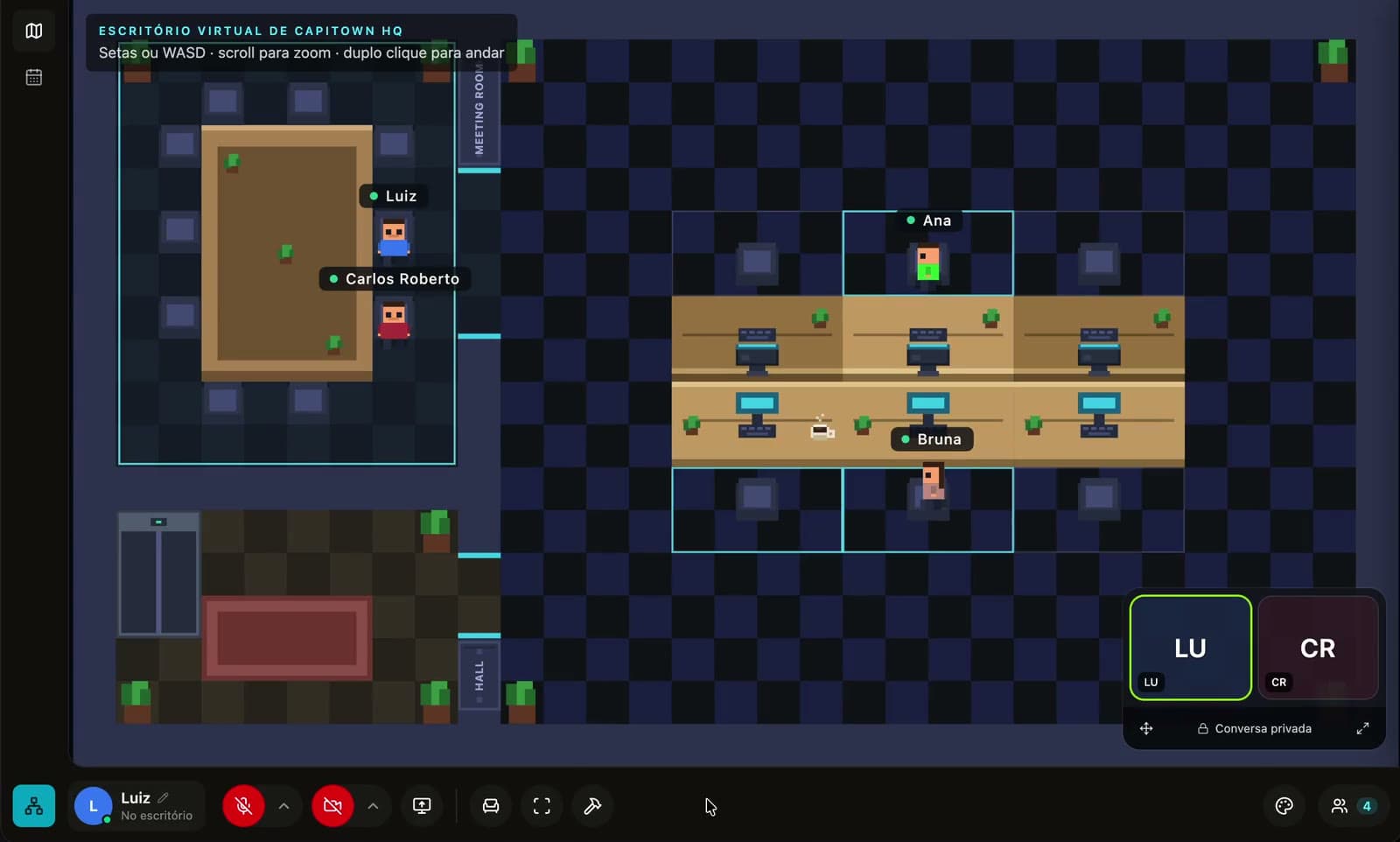
Virtual office software is the online place where a remote or hybrid team spends the workday: everyone appears in the same space, you can see who is available, and a conversation starts without a meeting link. It is not a business address, not a remote desktop (Citrix, Azure Virtual Desktop), and not a video call that only exists while a meeting is open.
This guide is a set of criteria for choosing a virtual office platform for teams. We build Capitown, so we have a side in this conversation. That is why this guide is not a ranking and does not assign scores. The market changes, and the right choice depends on the team’s routine, not on a generic “best tools” list.
If the definition is still fuzzy, start with what a virtual office for remote teams is.
First, make sure the intent is right
People use “virtual office” in at least three ways:
- 1Collaboration software — a persistent map or set of rooms where the team works together. That is what this guide covers.
- 2A virtual business address — a legal seat, mail handling, sometimes an hourly room. We do not offer that.
- 3A remote desktop / VDI — reaching a work PC from somewhere else. That is not what we do either.
If you need a registered address or a mailbox, this is the wrong article. If you need a shared place for the team and fewer “got five minutes?” events on the calendar, keep going.
What virtual office software for teams needs to do
Not every product with an avatar is an all-day office, and not every meeting tool solves presence. When you compare, ask concrete questions:
Is the space persistent?
Does it stay open when nobody is in a meeting, or does it only exist after a timed invite? A real virtual office has to last the workday, not just the call.
Is presence visible?
Can you see who has arrived, who is at a desk, who is in a room, and who has asked not to be interrupted? A green dot in chat tells you less than a map or a floor plan.
How does a conversation start?
How many clicks sit between seeing someone and speaking to them? In Capitown, walking up to a desk starts a voice call, and you can also open the conversation with a click or the J key, turn on the camera, and share your screen. Other products use spatial audio, “hear what is nearby,” or a call button. What matters is the friction, not the feature name.
Can people protect focus?
Without a respected Do Not Disturb (or equivalent), the space becomes interruption. Presence is not surveillance: the right test is context before you walk over, not time spent online. Our guide to status and availability in remote work goes into that agreement.
Where does the office run?
Browser, desktop app, or both? An app in the Dock or the taskbar keeps the space from getting lost among tabs. Check the system: our desktop app supports Apple Silicon Macs (macOS 12 or later) and 64-bit Windows 10 or 11; on an Intel Mac, use the browser; the Linux app is on the way. For the day-to-day view, see virtual office app for remote workers.
What happens to the audio?
Are calls encrypted in transit? Is anything recorded? For some teams, recording and transcribing a meeting is a requirement. For others, it is a reason to walk away. In Capitown, audio runs over WebRTC with encryption in transit and we record nothing. The details are on our security page.
Language, support, and data
Is the interface in the team’s language? Is support? Under which law is personal data handled? For teams in Brazil, the LGPD and Portuguese-language support often belong on the list. In Capitown, the interface is in Portuguese and English, and our WhatsApp and email support is in Portuguese.
Customization versus simplicity
Some teams want to draw the floor plan, place objects, and redesign the office often. Others want to walk in and work, with a theme and a desk. More customization means someone has to maintain the map. Be honest about who that will be.
Billing model
Some tools charge per person, some per space, some per concurrent use. The right model depends on how the team grows. Compare the model on each product’s site on the day you decide, and do not rely on an old figure in an article.
Integrations
Calendar, chat, a code host, and other tools only matter if the team will actually use them. If an integration is non-negotiable, treat it as a cut criterion, not decoration.
People also look for virtual office software with avatars or a 2D virtual office. Those phrases usually point to the same category: a character or token on a map, not a grid of video tiles. Ask whether that map is where the team will spend the day, or only a backdrop for events.
Alternatives you will see in this market
Several platforms show up in the same kind of search. Get to know them on their own official sites:
- Gather — one of the best-known virtual offices, with a map, deep customization, a Mac and Windows app, and features such as recording and AI notes, according to the official site. If your team already uses it, or is leaving it, read our Gather Town alternative.
- SoWork, Kumospace, WorkAdventure, oVice, Teamflow, and others — each one emphasizes a different slice: presence and meetings, events, open source and self-hosting, spatial audio, embedded apps. We will not describe features here that we have not checked. Open each site and run the same list of questions.
- Capitown — ours. A live pixel-art map, proximity conversation, a meeting room, chat, status, a desktop app for Mac (Apple Silicon) and Windows, and a decision not to record conversations. The full list is on Features.
Avoid the shortcut of crowning a single “best virtual office platform” without showing the criteria. If you write or read a comparison, say what “best” is best for.
A short way to decide
- 1Write the team’s problem in one sentence (“our questions turn into 30-minute meetings,” “people at home miss the conversation in the office”).
- 2Mark the non-negotiables (language, recording or not, app, billing model, data rules).
- 3Trial at most two tools, with the same group and the same problem, over a few days of real work — not only a demo. The 14-day guide is built for that stage.
- 4Decide with examples (“we reviewed the proposal at the desk, without booking a call”), not with the mood of the last afternoon.
- 5Keep Zoom, Meet, or Slack for what they already do well. The virtual office sits beside them, as we describe in how to reduce Zoom and Meet meetings and in the comparison with Slack, Meet, Zoom, and Teams.
For hybrid teams, add one extra test: people in the physical office join the map too. Otherwise the space becomes the remote people’s room. See a virtual office for hybrid teams.
Frequently asked questions
What is the best virtual office software?
There is no single winner. The best option is the one that solves your team’s problem and clears the criteria you set: presence, conversation, focus, privacy, language, and billing model. Be wary of lists that name a champion without showing the test.
Is virtual office software the same as a virtual business address?
No. One is software for a team to work together; the other is an address and front-desk service. We offer only the first.
Do we need a desktop app?
Not necessarily. Many platforms, including Capitown, run in the browser. An app helps keep the office at hand, with notifications, without competing with dozens of tabs. Check that the team’s devices are supported before you make the app mandatory.
Does a virtual office replace Zoom?
Not for every meeting. It is a strong replacement for short internal conversations. Client meetings, interviews, and events usually stay on a traditional video call.
Does Capitown have a 2D map with avatars?
Yes. The office is a live pixel-art map. Each person has an avatar, a desk, and proximity voice chat. Today we do not have an advanced map editor, calendar integrations, or AI.