Every remote or hybrid team already has its tool stack: a chat like Slack or Microsoft Teams, a meeting tool like Google Meet or Zoom, and somewhere for tasks and docs. When a new tool shows up, the first question is natural: “what is this going to replace?”.
With Capitown, the honest answer is: none of them. Capitown was not built to be another chat or another video room. It is the place where your team hangs out during the workday, and because of that it also becomes a simple way to organize and keep up with the team. In this article, we compare Capitown with the most popular tools and show how they work together.
The 30-second summary
- Slack and Teams are great for written things that can wait: announcements, decisions, threads, and integrations.
- Google Meet and Zoom are great for planned meetings, with an agenda, external guests, and lots of people on screen.
- Capitown covers what sits in between: seeing who is around, talking right away, and seeing the team as a whole.
- Used together, each one does what it does best, and your calendar and chat get lighter.
Every tool has its role
Slack and Microsoft Teams: the written conversation
Chat is your team’s memory. It holds announcements, threaded discussions, system alerts, and the history someone will look up three months from now. It shines at async work: you write now and the other person answers when they can. The trouble starts when chat is used for what should be a two-minute conversation, and a question turns into twenty messages and an afternoon of waiting.
Google Meet and Zoom: the scheduled meeting
Video call tools are unbeatable for client meetings, interviews, big presentations, and meetings with people outside the company. They work through links and invites: the room exists while the meeting lasts. But not every conversation deserves a calendar event, and that is how many teams end up with calendars full of “quick syncs”.
Capitown: the office where the team hangs out
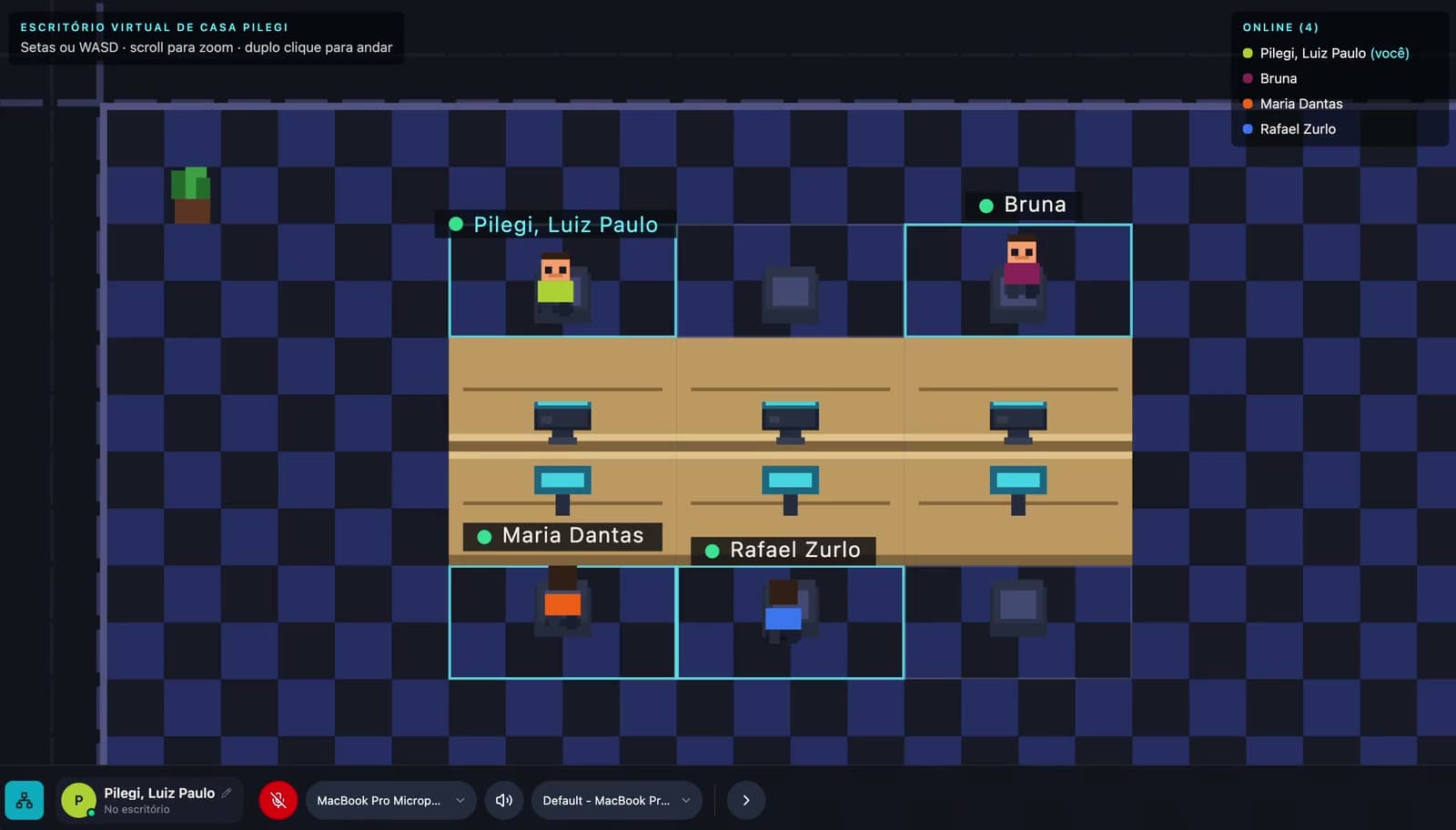
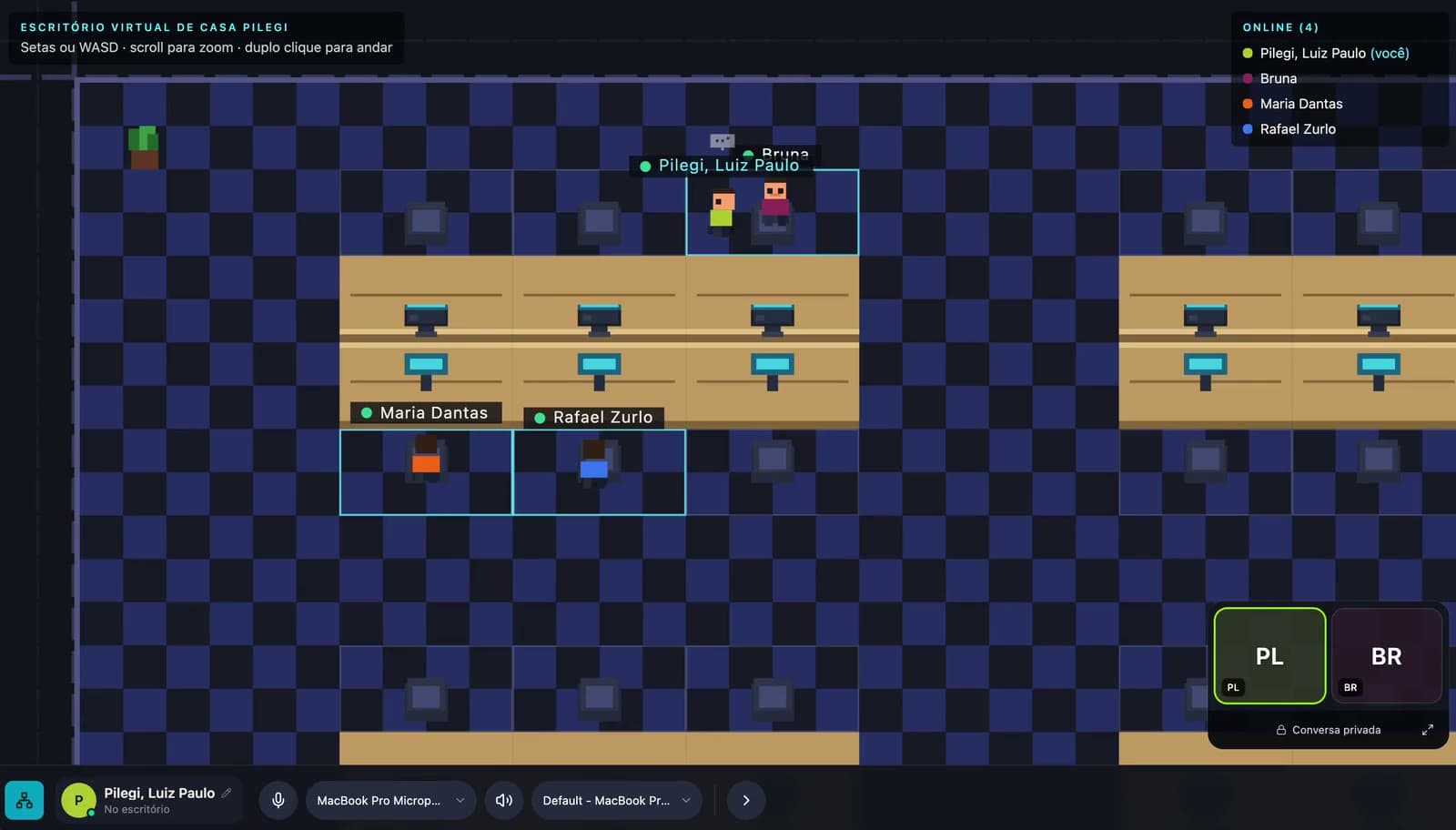
Capitown is a live map where each person has an avatar and a desk. At a glance, you can see who is working, who is busy, and who is free to talk. To talk to someone, you walk up to their desk and a voice call starts; walk away and it ends. It does not replace chat or meetings: it brings back the presence and spontaneous conversation that were lost when the team left the same floor.
Comparison: chat, video calls, and Capitown
This is not a contest over who has more features. It is about what each tool is for:
| Slack / Teams | Google Meet / Zoom | Capitown | |
|---|---|---|---|
| Built for | Messages, announcements, and history | Planned meetings | Presence and everyday conversations |
| How a conversation starts | A message, then waiting for a reply | A link and a calendar invite | Walking up to the desk of whoever is there |
| Knowing who is available | Status dot, not always up to date | Does not show it | Map and list of who is in the office, with status |
| View of the team | List of channels and members | Only who is in the meeting | Whole team organized in desk clusters |
| External guests | Possible, with shared channels | A strong point | Only people invited to the space |
| Records and search | A strong point | Recordings, when enabled | Voice conversations are not recorded |
More than communication: Capitown as a team management tool
Anyone leading a remote team knows the challenge is not just talking: it is knowing how the team is doing. Who has arrived, who is heads-down, who is stuck alone on a problem, who just joined and does not know anyone yet. Chat and video calls do not answer those questions. The map does.
Presence and status in one place
Everyone shows up with a status: Active, Away, Busy, or Do not disturb, and can add a custom status with an emoji and an expiry time, like “🍽️ Lunch until 1pm” or “🎯 Focused on the release”. The list of who is in the office shows all of this together, and you can wave at someone right from there. It is the kind of view a manager used to get by looking around the room, without asking in chat.
The team organized on the map
Admins can edit the map and set up desk clusters for each team or squad, plus open areas and the meeting room. Everyone has their own desk, their own way. The result is a living org chart: you can see the product, sales, and support teams, and who is in each one, without opening a spreadsheet.
Who is in, under control
Only people who were invited can enter the office. Invites expire, can be canceled, and each person gets a role: Member or Admin. When someone leaves the company, just remove them from the space. For whoever looks after the team, that means a clear list of who has access and how many seats of the plan are in use.
Team rituals without leaving the office
The daily stand-up, the weekly sync, and celebrating a launch can happen in the map’s meeting room, where everyone who walks in joins the same call, with camera and screen sharing. The chat’s general channel is for announcements and wins, and direct messages for quick notes. Big meetings with clients stay on Meet or Zoom.
“Presence is not surveillance. The map shows who is around, like you would see by looking around the room, and nothing more.”
Worth repeating: Capitown does not capture screens, count clicks, or record conversations. Management here means visibility and organization that make it easier to meet, not productivity tracking. The details are on the security page.
What a day looks like with all the tools together
An example day on a team that uses Capitown next to the tools it already had:
- 19am: everyone opens Capitown and sits at their desk. At a glance, the lead sees who has arrived and who set “🩺 Doctor until 10am”.
- 29:15am: the stand-up happens in the map’s meeting room. No link: everyone just walks over.
- 310am: a question about the layout? Instead of opening a Slack thread, the designer walks to the developer’s desk and sorts it out in two minutes, sharing the screen.
- 411am: the decision made in that conversation goes into Slack or Teams, so it is on record for the rest of the team.
- 52pm: a client meeting on Google Meet or Zoom, with an agenda and outside guests.
- 64pm: whoever needs focus turns on Do not disturb and stays visible on the map, without being pulled into conversations.
When Capitown makes sense for your team
- Your team is remote or hybrid and misses “stopping by” someone’s desk.
- Chat is full of “got 5 minutes?” and calendars are full of short meetings.
- Leads cannot tell, without asking, who is available or how the team is doing.
- New hires take a long time to fit in because they only see the team in formal meetings.
And when is it not the right tool? For documenting decisions, talking to clients, or running a webinar for hundreds of people, stick with your usual chat and video call. Capitown works best next to them.
Conclusion
Slack, Teams, Google Meet, and Zoom solved messages and meetings very well. What was missing was the office: the place where the team sees each other, meets without scheduling, and where leads can see the whole team. That is the space Capitown fills, as a companion to your tool stack and a lightweight way to organize the team, not a replacement. If your team’s calendar is full of short calls, see how to cut down on Zoom and Meet meetings, and to understand the concept from scratch, read what is a virtual office.
To take short conversations off the calendar, see how to reduce Zoom and Meet meetings. And if you are comparing virtual offices, read our Gather Town alternative.
Want to see how it fits your team’s routine? Create your space with a 14-day free trial and use it in the browser or in the app for Mac and Windows.
Frequently asked questions
Does Capitown replace Slack or Microsoft Teams?
No. Capitown has a chat with a general channel and direct messages, but it was built for presence and quick voice conversations. Docs, threads, and integrations stay in Slack or Teams.
Do I need to stop using Google Meet or Zoom?
No. Client meetings, interviews, and big events stay there. Capitown takes the team’s short conversations off the calendar: they happen at the desk or in the map’s meeting room instead.
How does Capitown help manage a team?
It shows who is in the office and with which status, organizes the team into desk clusters on the map, and controls who has access through invites and Member or Admin roles.
Does Capitown track people’s productivity?
No. The map shows presence and status, like you would see by looking around the room, but it does not capture screens, count clicks, or record conversations.
How much does it cost to use Capitown alongside other tools?
Plans start at a fixed monthly price for the whole space, with a 14-day free trial. You do not need to cancel any other tool to use it.