If your team’s calendar is full of “quick syncs,” the problem is not the length of the meeting: it is that there is no easy way to talk on the spot. Cutting meeting time starts with separating what needs a calendar slot from what fits a two-minute conversation.
This guide gives you a way to make that split, rules for a quick meeting, and a one-week test. For the Zoom and Meet angle, see also how to reduce meetings with a virtual office.
What is a quick meeting?
A quick meeting is a short, unscheduled conversation, usually between two or three people, that solves one specific question in up to 10 minutes. It has no invite, no agenda document and no recurring slot. It ends with a decision or a next step, and the outcome is written down in one line in chat.
It is not the same as a short meeting. A short meeting, like a daily stand-up, is on the calendar, has a fixed time and a small agenda. A quick meeting happens when the question appears.
First, triage: what kind of conversation is this?
| Type of conversation | Format that usually works |
|---|---|
| A specific question between two people | Quick conversation, no invite |
| Aligning on the next step of a task | Quick conversation or a message |
| A decision with several people | Short meeting, with an agenda |
| Project status with no decision | Written message |
| Client, interview, event | Scheduled video call |
Rule of thumb: if only one or two people need to talk and there is nothing for a group to decide, it probably does not need an invite.
5 rules for a quick meeting
- 1One question per conversation. If a second topic appears, it becomes another conversation.
- 2Up to 10 minutes. Past that, it becomes a real meeting, with an agenda.
- 3End with a decision or a next step. No leaving without knowing who does what.
- 4Log the outcome in one line in chat. People who were not there need to find the answer later.
- 5Respect focus. Before calling, check the status. If the person is on Do not disturb, wave or send a message.
Quick meeting or short meeting?
People often use the two terms as if they meant the same thing. On a remote team, keeping them apart helps you decide what goes on the calendar.
| Quick meeting | Short meeting | |
|---|---|---|
| Scheduled? | No, it happens when the question appears | Yes, it has a fixed time |
| Who | Two or three people | The team or a group |
| Length | 2 to 10 minutes | Usually 15 minutes, with a timebox |
| Agenda | One question | A small, repeated agenda |
| Example | “Can you check this pull request with me?” | Daily stand-up, weekly sync |
If you want to shorten recurring meetings, see short meeting: how to run a 15-minute remote daily stand-up.
A 3-step script for a quick catch-up
- 1Open with the question, not with context. “I need a yes or no on the new onboarding copy.” Context comes only if the other person asks for it.
- 2Show, do not describe. If there is something on screen, share it in the first minute. A two-minute look replaces a long thread.
- 3Close out loud and in writing. “So we keep version B, and I publish today.” Then post that sentence in chat, in the channel or the direct message where the topic lives.
Common mistakes
- Turning every question into a call. If the answer fits in one line, a message is still faster.
- Inviting “just in case.” A quick meeting with five people has become a meeting. Bring in only who needs to decide.
- Not writing anything down. The team loses the answer, and the same question comes back next week.
- Ignoring status. Calling someone on Do not disturb breaks the agreement that makes quick meetings work.
How to run a quick meeting without creating a link
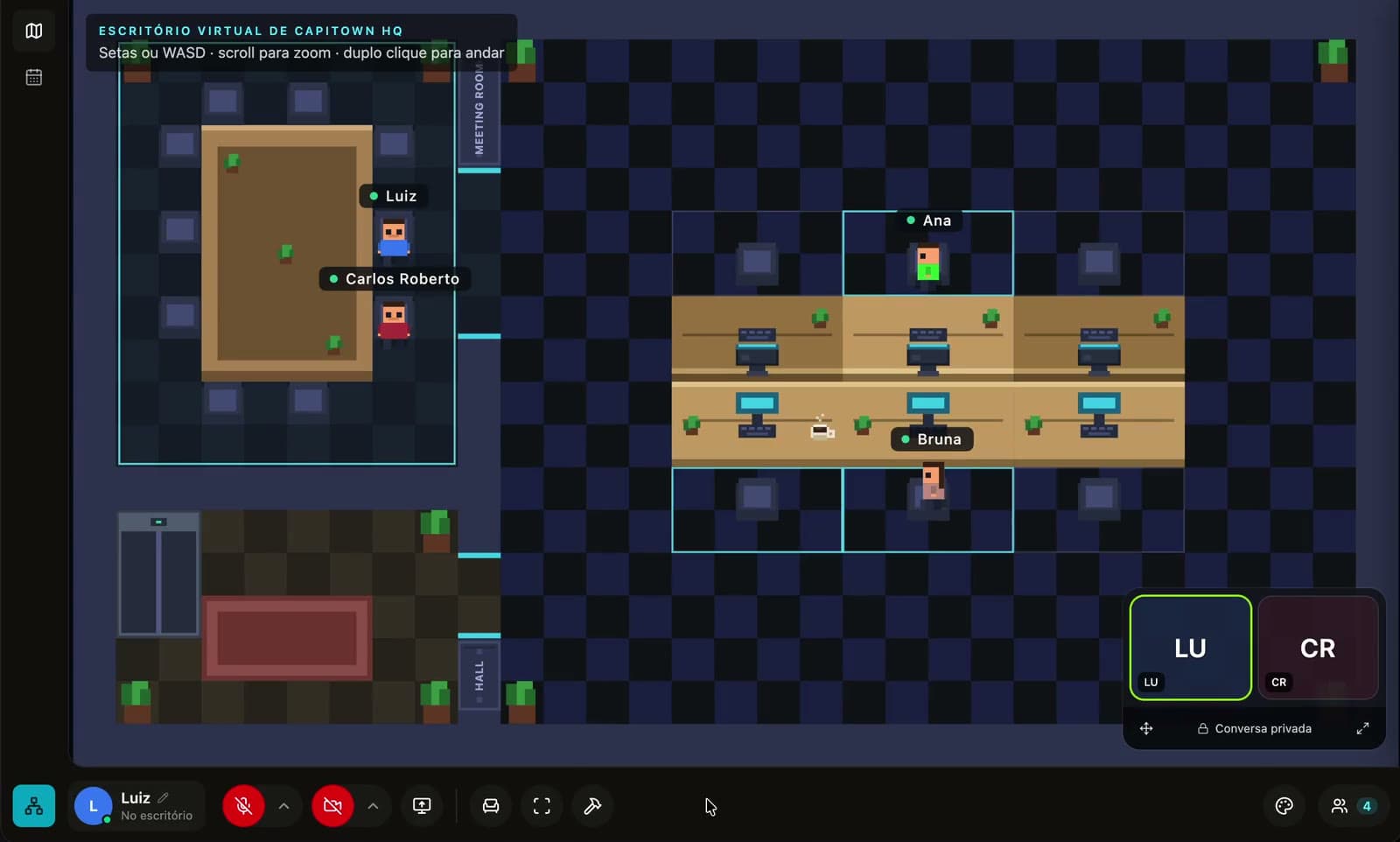
On a regular call, ringing someone involves an invite, a link and a wait. In a virtual office, the conversation starts differently. In Capitown, you see who is available on the map, walk up to their desk, and the voice call opens. If the person is busy, you send a wave and they reply when they can. The status agreement is covered in status in remote work. If something needs to be seen, turn on the camera or share your screen in the same conversation, with no new link. The full list is on the features page.
What stays a scheduled meeting
Client meetings, interviews, events, and decisions involving many people stay on the calendar. The point is not to cancel everything, but to take off the calendar whatever only became a meeting for lack of an alternative. For recurring rituals, such as the daily stand-up, the goal is not to remove them but to keep them short. See how to run a 15-minute remote daily stand-up.
A one-week test
- 1This week, add up each person’s meeting hours in the group.
- 2Next week, use the 5 rules and a quick conversation for every specific question.
- 3Compare the hours and ask the team what got better and what got worse.
To do this inside a virtual office, the 14-day rollout plan shows how to start with a small group. To see what a virtual office is, read what a virtual office is. When you want to try it, create your Capitown space.
Frequently asked questions
What is a quick meeting?
A quick meeting is a short, unscheduled conversation, usually between two or three people, that solves one specific question in up to 10 minutes, with no invite or agenda document.
What is the difference between a quick meeting and a short meeting?
A quick meeting happens when a question appears and has no calendar slot. A short meeting, like a daily stand-up, is scheduled, has a fixed time and a small agenda, and usually lasts about 15 minutes.
How long should a quick meeting last?
Up to 10 minutes, and most fit in two or three. Past that, the topic probably deserves an agenda and an invite.
What is a quick catch-up meeting?
It is a quick meeting to get back in sync on one topic, for example after a day off or before a handoff. Open with the question, share your screen if needed, and close with one line in chat.
How do I reduce meeting time without losing alignment?
Separate what needs a group decision from specific questions. Questions become quick conversations, status becomes a written message, and the calendar is kept for what truly needs a meeting.
Does a quick meeting need a link?
No. In a virtual office, the conversation starts when you walk up to the person on the map. That removes the invite and the link.
Does this work for large teams?
Yes, as long as there is an agreement on status and focus. Without it, how easy it is to call someone becomes constant interruption.